Essential Web Support Services for Businesses
Web support services keep a business website working. They fix technical problems and help it adapt as business needs change. The right support plan mixes routine maintenance, repairs, and planned upgrades instead of treating each issue as a one-off emergency. This article explains the main services to consider, how they differ, and what to clarify before you choose a provider.
What should web support services include?
A useful web support plan should cover preventive maintenance, fault diagnosis, recovery planning, and clear help when something goes wrong. Depending on your website, it may also include content changes, performance reviews, access improvements, and support for connected business tools. Treat this as a scope to agree on, not a promise that every provider includes everything.
Start with the actions your website must support. A professional services business might prioritize inquiry forms and appointment booking. An online retailer needs a more detailed checklist for product selection, checkout, and order processing.
Use these categories when discussing coverage:
Routine care: Software updates, backup checks, and scheduled reviews of important functions.
Incident response: Investigation and repair when pages, forms, or integrations stop working.
Experience improvements: Planned work on mobile use, access, and performance.
Business changes: New pages, revised content, extra features, and integration changes.
Communication: A named contact, an escalation process, and clear records of completed work.
Ask the provider to identify which tasks are included, which need approval, and which fall outside its expertise. That conversation is more useful than comparing packages by the number of features listed.
Ongoing website support starts with controlled maintenance
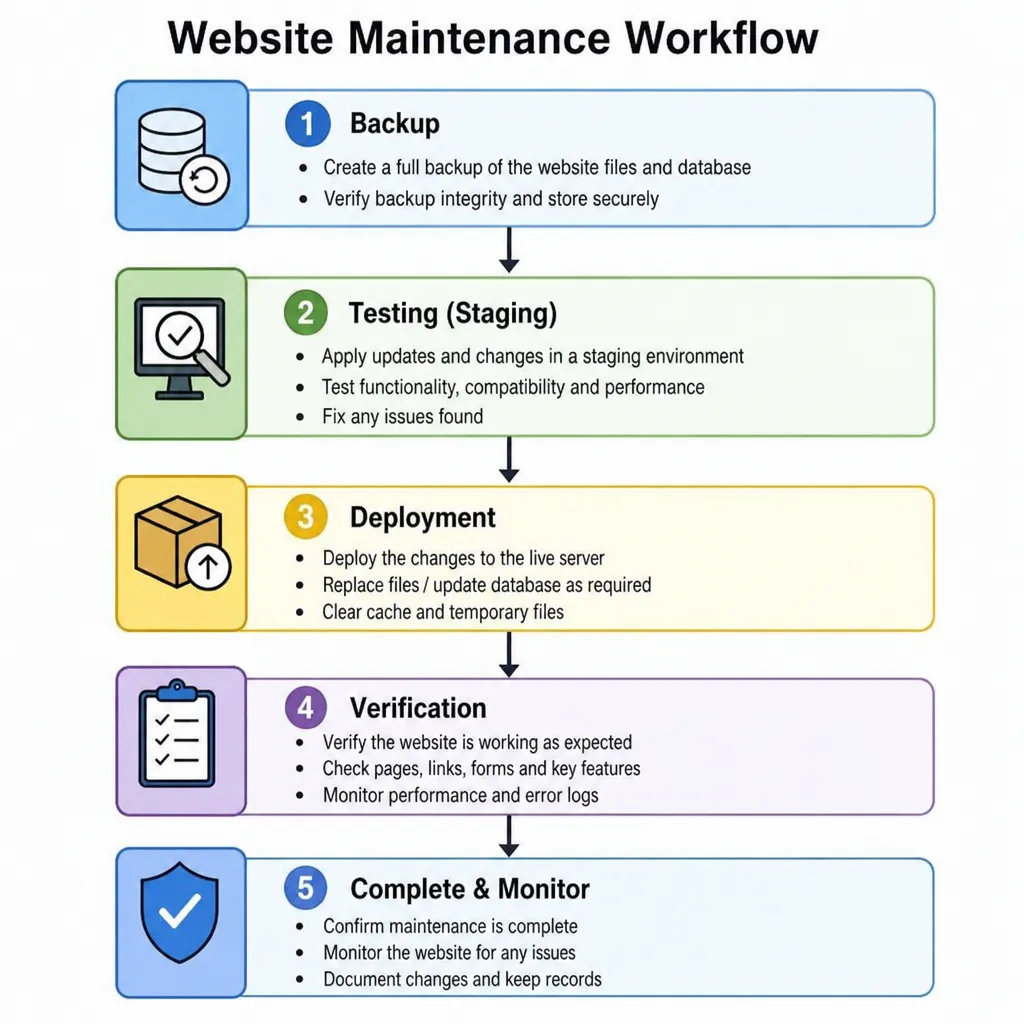
For ongoing website support, prioritize a repeatable maintenance process over a vague promise to keep everything updated. Ask who reviews updates, how someone tests changes, and what happens if a release causes problems. WordPress documentation recommends backing up a site before you update its software.
Updates, backups, and recovery
Request a maintenance workflow that includes checking release notes, preparing a backup, testing key functions, and documenting the result. For higher-risk changes, ask whether the provider uses a staging environment, which is a separate copy of the website for testing. WooCommerce recommends backing up a store and testing updates on staging before applying them to the live site.
Discuss recovery in practical terms. Which files and data does the coverage include? How recent would the recovery point be? Who can approve a restore, and when was the restore process last tested?
Security responsibilities and access
Put responsibility for hosting, website software, account access, and incident handling in writing. WordPress security guidance says website security depends on both the host and the app, and that security is risk reduction rather than full risk removal.
Ask for individual accounts where appropriate, access limited to the work required, and a clear offboarding process. Establish who will receive security alerts and who will decide whether urgent action is needed. Avoid accepting a claim that security is included without an explanation of the actual work and its limits.
Web repair services should address the underlying problem
When evaluating web repair services, ask for diagnosis, verification, and a plain-language explanation—not just confirmation that the homepage loads again. A useful repair brief should describe the affected function, the circumstances that cause it to fail, and the business activity that the failure interrupts.
For example, if an inquiry form seems to submit successfully but no message arrives, define success as receiving and checking a complete test inquiry. Ask the technician to investigate the submission path and delivery path rather than making an unrelated design change.
Before engaging a website repair service, prepare:
The affected page or process: Include the address and the exact action that fails.
Evidence: Capture error messages, screenshots, and the approximate time of failure.
Recent changes: Note updates, new integrations, content edits, or hosting changes.
Business impact: Explain whether the issue blocks purchases, inquiries, bookings, or internal work.
Acceptance criteria: Specify what must work before you consider the incident resolved.
Share access through an agreed secure method rather than putting passwords into an ordinary support request. Afterward, request a short record of the cause, the repair, and any recommended follow-up. Use that record when deciding whether preventive work deserves priority.
Website upgrade services should follow a business goal
Use website upgrade services when you need better capability, not just a return to normal operation. Start with an outcome such as simpler appointment booking, easier service information, or a link between website inquiries and your customer management system.
Write a short brief that explains the current difficulty, the intended user, and the desired result. Then ask the provider to separate essential work from optional extras. To get more bookings, you can set some simple rules.
Choose an available time.
Get a confirmation.
Check the booking in your system.
For performance projects, ask for an explanation of the user problem behind each proposed change. Google's guidance encourages reviewing the full page experience, including mobile display and Core Web Vitals, rather than focusing only on one score. It also says good scores do not guarantee top search rankings.
Agree on how the team will test the upgrade and who will approve the release. Include any staff instructions needed to use the new feature. A technically complete handover should also make sense to the people operating the website.
Ecommerce maintenance services need transaction-level checks
For an online store, define ecommerce maintenance services around the complete purchase journey. WooCommerce's update guidance suggests testing product pages, the cart, checkout, payments, shipping, taxes, and order emails. You should also check functions specific to extensions. Checking the storefront alone does not satisfy that workflow.
Build a store-specific test plan rather than copying another retailer's checklist. Include the payment methods, delivery options, discounts, and customer account functions your business actually uses. Ask how staff will identify and handle test orders so they know which activity is part of maintenance.
Discuss release timing before busy trading periods. Require an explanation of how a proposed rollback would handle orders and customer activity recorded after the backup. Agree on who coordinates with payment, shipping, or inventory providers when the investigation crosses system boundaries.
Finally, decide who can pause a release or disable an affected feature. Keep that decision with one named person rather than leaving it unresolved during an incident.
How do you choose the right support arrangement?
Choose a support arrangement by matching the scope, availability, and approval process to your website's business role. Compare what providers commit to doing, not just their hourly rates or package names. Request separate definitions for acknowledging a request, starting an investigation, and restoring service.
For a simple site, consider scheduled maintenance with separately approved changes. For a store or booking platform, discuss broader functional testing and an explicit urgent-response process. Ask providers to explain where your requirements exceed their standard coverage.
Before signing, confirm these points:
Supported systems: Identify the platform, custom code, and integrations covered.
Availability: Specify support hours, urgent contact methods, and any after-hours arrangements.
Charges and approvals: Clarify included work, exclusions, spending approval, and unused allowances.
Ownership and access: Keep business ownership of relevant accounts and agree on provider permissions.
Reporting: Request useful records of changes, incidents, unresolved risks, and recommended priorities.
Exit arrangements: Establish how documentation, access, and outstanding work will transfer.
Ask what onboarding involves, too. Request an initial review of the website, available documentation, and known problems before treating the support scope as settled.
Turn support into a practical operating plan
Begin by listing your key website tasks. These include submitting an inquiry, making a booking, completing a purchase, or accessing your account. Assign someone internally to own that list and approve changes. Then agree with your provider on which journeys receive routine testing and which failures require urgent escalation.
Keep a shared improvement backlog separate from incident requests. Rank proposed work by business impact, urgency, and effort, and ask for approval before major changes begin. Use review meetings to resolve open decisions rather than simply reading a list of completed updates.
The best-fit site maintenance service is one whose responsibilities you can explain clearly. Establish the essentials first: preventive care, a workable recovery plan, reliable repair procedures, and controlled improvements. With those expectations documented, you can manage website support as an ongoing business function instead of a string of emergencies.
Q&A
Question: How is routine website maintenance different from emergency web repair?
Short answer: Routine maintenance is planned preventive work, such as software updates, backup checks, testing important functions, and documenting changes. Emergency web repair is work done to fix a specific problem. This could be a broken form, a checkout issue, or a failed integration. A strong support arrangement should include both, ensuring that the team maintains the website regularly while also establishing a clear process for urgent incidents.
Question: Why should backups and staging environments be discussed before updates are applied?
Short answer: Updates can sometimes cause conflicts, especially on sites with plugins, custom code, ecommerce features, or integrations. A backup gives the business a recovery option, while a staging environment lets higher-risk changes be tested before they affect the live site. Discussing these steps in advance clarifies who is responsible, what can be restored, and how quickly service can recover if something goes wrong.
Question: What information should a business provide when reporting a website problem?
Short answer: A useful support request should include the affected page or process, evidence such as screenshots or error messages, recent website or hosting changes, the business impact, and clear acceptance criteria for resolution. This helps the provider find the real cause. It avoids making only surface changes or just checking if the homepage loads.
Question: Why do ecommerce websites need more detailed maintenance than simple informational sites?
Short answer: Ecommerce websites depend on a complete transaction journey, including product pages, cart behavior, checkout, payments, shipping, taxes, order emails, discounts, and customer accounts. A store can appear normal while a payment method, shipping rule, or order notification is failing. That is why ecommerce maintenance should include transaction-level checks based on the store's actual features and sales process.
Question: What should be clarified before choosing a web support provider?
Short answer: Businesses should clarify supported systems, availability, urgent contact methods, included work, exclusions, approval rules, ownership of accounts, reporting expectations, and exit arrangements. They should ask how onboarding works. They should also check if the provider will review the website, documents, integrations, and known risks before finalizing support.