Importance of Ongoing Website Maintenance Strategies
Ongoing website maintenance is the recurring work of keeping a website functional, recoverable, current, and useful to visitors. A practical strategy combines technical checks, content reviews, performance improvements, and clear responsibility for fixing problems. Rather than treating launch day as the finish line, use maintenance to protect the experience your website promises—and make improvements without losing track of essential upkeep.
What should ongoing website maintenance include?
Ongoing website maintenance should include software updates, backups, functionality testing, content reviews, and checks on search visibility, accessibility, and performance. WordPress’s maintenance guidance, for example, treats backups and content updates as recurring responsibilities, while Google recommends reviewing Search Console periodically and after relevant site changes. The exact workload should reflect your platform, publishing activity, and business priorities.
Start by identifying what visitors must be able to do. For a service business, that might mean finding accurate information and submitting an inquiry. For an online store, prioritize product discovery, checkout, and order confirmation. Build your checklist around these journeys rather than checking only whether the homepage loads.
Give each task an owner, a review frequency, and a clear definition of completion. “Check contact form” should mean submitting a test inquiry and confirming delivery—not simply looking at the form.
Protect changes with backups and a recovery plan
Before significant changes, establish a reliable way back. WordPress recommends backing up before updating its core software, themes, or plugins, as well as before migrations and other substantial changes. Treat that principle as a checkpoint in your update process rather than an optional precaution.
Build your recovery procedure around practical questions:
Coverage: Confirm which files, databases, uploads, and configuration details the backup includes.
Frequency: Choose intervals based on how much recent content or transaction data you could reasonably afford to lose.
Access: Document who can retrieve backups if the usual administrator is unavailable.
Restoration: Schedule a controlled restore test and record the steps, dependencies, and problems discovered.
For substantial updates, use a separate testing environment where available. Check the affected features before release, then repeat the essential tests on the live website. Record what changed so troubleshooting does not begin with guesswork.
Include account ownership in this plan. Keep an inventory of administrative access, hosting contacts, renewal responsibilities, and external integrations. Review it when staff or suppliers change, and avoid leaving critical access tied solely to one person’s inbox.
How often should you perform site maintenance?
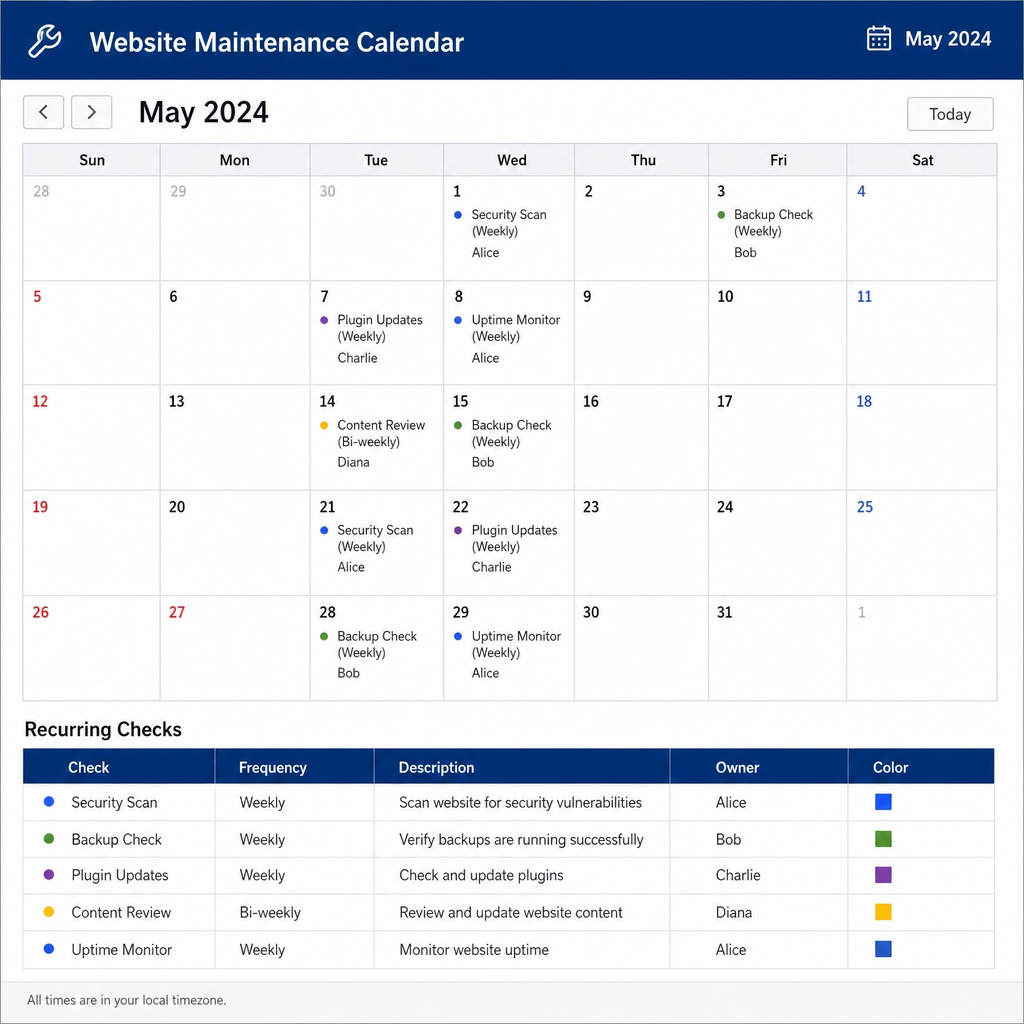
Set your site maintenance schedule according to business risk, website complexity, and how frequently information changes. Use the following cadence as a starting framework, not a universal rule. Assign separate handling for urgent problems so an important fix never waits simply because the next scheduled review is weeks away.
Cadence | Suggested checks | Completion standard |
|---|---|---|
Daily or automated | Availability alerts, backup status, critical transaction failures | Review exceptions and assign action |
Weekly | Key forms, important visitor journeys, pending updates | Complete tests and record unresolved issues |
Monthly | Content accuracy, performance trends, search reports, access changes | Prioritize fixes with named owners |
Quarterly | Recovery exercise, supplier scope, broader usability review | Update procedures and improvement priorities |
Increase attention around launches, campaigns, migrations, and major integrations. Before a promotion, for instance, test the landing page, inquiry route, confirmation message, and internal handoff together.
Keep the schedule realistic. A short checklist that someone consistently completes is a better operating plan than an ambitious document with no time allocated to it.
Make site optimization part of routine upkeep
Performance work belongs alongside reliability checks. Google’s web performance guidance explains that image optimization can reduce transferred data and that resource loading affects page load time. Review these areas when adding media, changing templates, or introducing third-party features—not only during a redesign.
Start with representative pages: a homepage, a content-heavy article, a service or product page, and a conversion page. Compare similar tests before and after a change, noting device conditions and what was modified. Avoid treating one score as the complete picture of site health.
Create a focused site optimization backlog. Consider appropriately sized images, unnecessary scripts, and resource-loading improvements, but investigate before removing anything. A script that appears expendable may support an important business function.
Validate the visitor experience after each improvement. Your acceptance check should include readable content, working navigation, usable controls, and successful completion of the page’s main task.
Keep content, accessibility, and search checks connected
Include editorial upkeep in website management. Review service descriptions, team information, downloadable documents, campaign pages, and contact details with the people responsible for their accuracy. Ask whether each page still answers its intended visitor’s question and provides a sensible next step.
For accessibility checks, examine keyboard navigation, visible focus, image alternatives, form labels, and content at increased zoom. W3C’s Easy Checks provides an introductory review framework, but explicitly warns that passing these checks does not establish comprehensive accessibility. Plan deeper evaluation where needed rather than presenting a basic checklist as certification.
For search monitoring, use Search Console to investigate crawling, indexing, and search performance. Google recommends periodic reviews and checks after site changes; use that information to select pages for investigation rather than assuming every fluctuation requires an immediate rewrite.
Keep findings together. Assign a page owner, describe the problem, and specify how the correction will be verified.
Choose maintenance services by scope and accountability
If you are considering a web maintenance company, start with your operational requirements rather than the longest feature list. Ask prospective providers to explain exactly what they will monitor, maintain, test, and report. Request a sample workflow so you can see how an issue moves from discovery to resolution.
Compare maintenance services using questions such as:
Included work: Are updates, content edits, recovery assistance, and technical investigations included, limited, or separately quoted?
Response expectations: How are urgent incidents distinguished from routine requests, and what happens outside normal support hours?
Testing: Which pages and visitor journeys are checked after changes?
Ownership: Who controls accounts, backups, documentation, and access when the agreement ends?
Communication: Will reports show completed work, outstanding risks, and decisions requiring your approval?
Distinguish website support services from broader improvement work in the agreement. Define whether support covers troubleshooting only or also includes development, content changes, and optimization.
Keeping work in-house is also an option. Apply the same expectations: documented ownership, available skills, protected time, and a clear escalation route.
Measure outcomes instead of counting tasks
Build a compact maintenance report around evidence of completion and unresolved risk. Record successful journey tests, restore-test results, recurring errors, and the age of outstanding issues. Include relevant performance and search observations, but explain what action, if any, the findings justify.
Separate maintenance activity from business outcomes. Updating software is a completed task; confirming that the inquiry process still works is a verification result. Neither, by itself, proves that maintenance caused a change in sales or leads.
Use a simple prioritization order:
Restore essential functions: Address confirmed failures affecting critical visitor tasks.
Reduce known exposure: Resolve important update, access, or recovery concerns.
Remove recurring friction: Investigate repeated complaints, failures, or manual workarounds.
Improve deliberately: Schedule enhancements with a clear goal and acceptance test.
Review recurring incidents for underlying causes. If the same feature repeatedly needs repair, assign an investigation rather than accepting repeated fixes as normal upkeep. Record the proposed remedy, its owner, and the evidence needed to close the issue.
Build a strategy your team can sustain
Effective ongoing website maintenance needs a workable rhythm: inspect, prioritize, change, verify, and document. Start with essential visitor journeys, a tested recovery procedure, and named owners for recurring tasks. Then expand the plan as your team’s capacity and website requirements become clearer.
Whether you manage the work internally or use outside support, make accountability visible. Every important check should lead to a recorded result, and every unresolved problem should have a next action.