Essential Website Maintenance Services for Businesses
Website maintenance services are the ongoing technical checks, updates, repairs, and content changes that keep a business website ready for customers. A useful plan covers security, recovery, performance, functionality, and accountable web support—not simply software updates. This article explains what to include, how to compare providers, and how to connect maintenance spending to the business activities your website supports.
What should website maintenance services include?
Website maintenance services should include software updates, security monitoring, recoverable backups, performance checks, content upkeep, functional testing, and a clear support process. The exact scope should reflect your platform and the consequences of a failure. WordPress’s maintenance guidance, for example, includes updates, backups, content changes, link checks, and reviewing site statistics.
Start with what visitors must accomplish. For a professional services business, that might be finding the right service and submitting an inquiry. For an online store, it means browsing products, paying successfully, and receiving accurate order information.
Use those journeys to prioritize work. A broken inquiry form deserves attention before a cosmetic adjustment to an old blog post. Ask prospective providers to explain how their site services protect these activities, rather than presenting a long list of tools without context.
The core work behind dependable web maintenance
Security updates and access controls
Keeping software current is a basic security practice, but it should sit alongside account protection and controlled access. CISA recommends timely patching, multifactor authentication, and limiting users to the access their work requires. Apply that thinking to your website administration, hosting, domain registrar, and connected business tools.
Ask your provider to maintain an inventory of the software and integrations they support. That inventory should identify who handles updates and what happens when a component is no longer suitable for use. Make responsibility explicit when your host, developer, and maintenance provider are separate companies.
Updates also need a safety process. WordPress recommends backing up before updating, while its theme troubleshooting guidance recommends testing changes on a staging site before applying them to the live website. A staging site is a separate environment for checking changes without immediately exposing them to customers.
Request a documented sequence: assess urgency, prepare a backup, test where appropriate, deploy, and verify important functions. Ask how urgent security fixes move through that process without unnecessary delay.
Backups and practical recovery
A backup plan should explain both what is saved and how restoration works. For WordPress, recovery requires the database and relevant website files—not just one or the other. CISA also recommends protecting critical backups and regularly testing their availability and integrity.
Before agreeing to a plan, establish:
Coverage: Confirm whether backups include uploaded media, databases, configuration, and custom code.
Frequency: Choose a schedule that reflects how often valuable information changes.
Retention: Specify how far back available recovery points extend.
Protection: Ask how backups remain protected if production accounts are compromised.
Restoration: Identify who performs recovery, whether testing is included, and what additional charges apply.
Translate recovery into business terms. Ask how much recent information you could afford to lose and how long you could operate without the website. Use those answers to evaluate the proposed arrangement, rather than assuming that “daily backups” settles every recovery question.
Performance and site optimization
Performance work should begin with measurement, not a promise to install another plugin. Google’s web performance guidance identifies third-party scripts as a potential source of slowdowns and recommends tools such as PageSpeed Insights and browser developer tools to investigate their cost.
Ask for testing across representative pages: a service page, a content-heavy article, a campaign landing page, and a product page where relevant. Have the provider explain each proposed change, the problem it addresses, and how they will verify the result. Require checks that important features still work after optimization.
Keep SEO expectations realistic. Google uses Core Web Vitals in its ranking systems, but explicitly states that strong scores do not guarantee top rankings. Site optimization should therefore serve visitors and business tasks, not become an endless pursuit of a perfect test score.
For example, ask whether a slow booking page needs a technical adjustment or a review of its embedded tools. The useful outcome is a clearer diagnosis and a tested improvement—not an unexplained dashboard number.
Content, functionality, and accessibility checks
Treat content accuracy as an assigned responsibility. Have someone review service descriptions, team information, opening hours, downloadable documents, and campaign offers. Give the maintenance provider approved changes and identify who signs them off before publication.
Functional reviews should follow complete customer journeys. Submit an inquiry and confirm its receipt; do not stop when the form displays a success message. For a store, define an approved checkout-testing method and verify the expected order communications.
Include accessibility checks in routine reviews. W3C’s introductory guidance covers matters such as keyboard access, visible focus, text alternatives, form labels, and error handling. It also cautions that these preliminary checks are not a comprehensive accessibility assessment, so avoid treating a quick scan as proof that every barrier has been removed.
Keep the review practical: select important templates, record problems clearly, assign fixes, and retest. Ask for specialist assessment when your needs go beyond the provider’s demonstrated expertise.
Build maintenance into everyday site management
Agree on a working rhythm instead of leaving web maintenance until somebody notices a problem. Separate routine work from urgent incidents, and reserve planned review time for changes that need business input. The following is a suggested starting framework, not a universal service standard.
Workstream | Suggested working approach | Business responsibility |
|---|---|---|
Security and availability | Review alerts and escalate urgent issues promptly | Maintain current emergency contacts |
Updates and backups | Schedule routine work with risk-based exceptions | Approve suitable change windows |
Customer journeys | Test after relevant changes and on an agreed schedule | Identify priority forms, bookings, and transactions |
Content accuracy | Review regularly and whenever business details change | Supply accurate information and approvals |
Performance | Establish a baseline and revisit after substantial changes | Explain campaign priorities and customer complaints |
Name an internal website owner, even when technical work is outsourced. Give that person authority to prioritize requests, approve changes, and coordinate marketing, operations, and IT. Avoid making the provider guess which department’s request takes precedence.
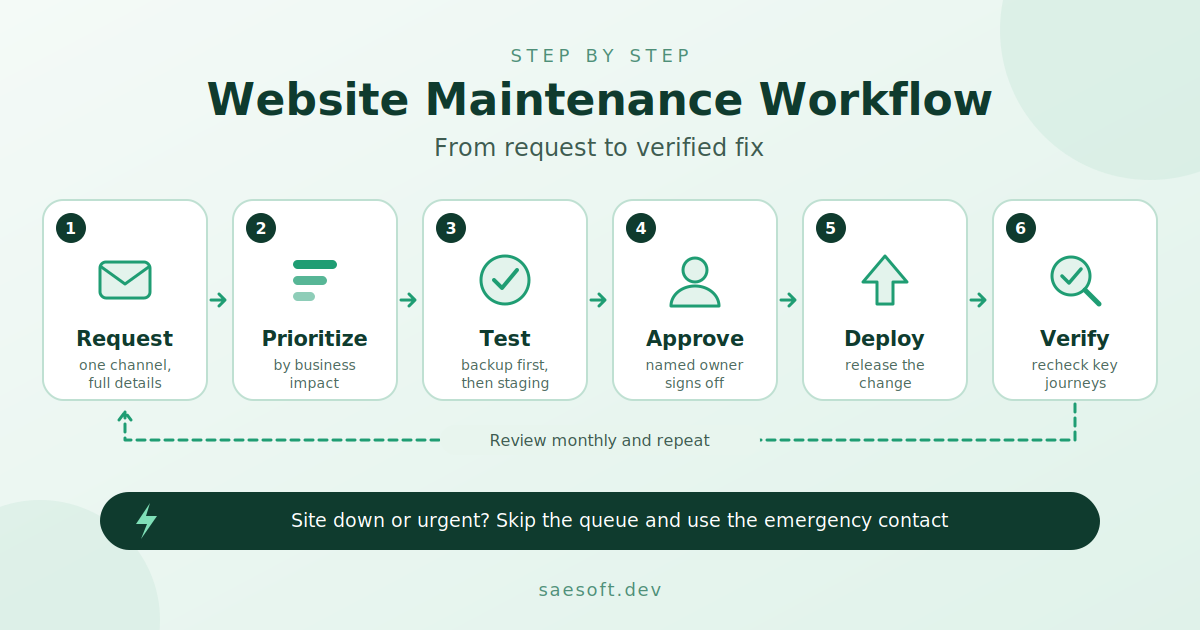
Use one request channel with a visible history. A useful ticket includes the affected page, expected behavior, actual behavior, screenshots where helpful, and business impact. For urgent problems, specify a separate escalation route that remains available if the website itself is down.
How do you choose the right maintenance provider?
Choose a provider whose technical expertise matches your platform, whose scope covers your important customer journeys, and whose support commitments fit your operating needs. Compare written responsibilities and realistic examples of their process—not just package names. Ask each candidate to explain how they would handle the same hypothetical incident.
Start with platform fit. Request examples of maintenance work on your CMS and comparable integrations, without asking for confidential client information. For WordPress, discuss plugins, themes, and custom code; for Joomla, Drupal, or Magento, ask specifically about the components and workflows your installation uses.
Security coverage also deserves a precise conversation. Drupal’s security policy distinguishes between covered projects and external libraries, illustrating why “we maintain your CMS” needs a defined boundary. Ask who tracks dependencies outside the platform’s core and how unsupported components are handled.
Then examine the commercial details:
Included work: Separate routine maintenance, content edits, troubleshooting, development, and incident recovery.
Support availability: Confirm working hours, time zones, emergency channels, and holiday arrangements.
Response commitments: Distinguish acknowledging a request from starting work and restoring service.
Usage limits: Clarify task limits, queue rules, revision allowances, and exclusions behind “unlimited” wording.
Ownership and exit: Establish access to accounts, backups, documentation, licenses, and custom code when the relationship ends.
Reporting: Request a sample showing completed work, unresolved issues, and recommended next actions.
Choose the service model around your needs. Consider a recurring plan for ongoing preventive work, an hourly arrangement for clearly bounded requests, or a custom agreement when your integrations require specialist attention. Ask each provider to price the same scope so you can compare offers meaningfully.
Be especially clear about online support. Establish whether it means email ticketing, live chat, remote technical assistance, or incident handling. Do not assume that continuous monitoring includes a person authorized and available to fix every detected problem.
How can you measure the value of maintenance?
Measure maintenance by whether it protects important website activities, improves operational visibility, and produces useful evidence of completed work. Set a baseline before expecting improvement, and distinguish technical results from broader business outcomes. Avoid attributing every movement in sales or inquiries to maintenance alone.
Build a small scorecard around questions you can answer consistently:
Reliability: Were important pages and customer journeys available when needed?
Recovery readiness: When was restoration last tested, and what remained unresolved?
Service quality: How quickly were urgent tickets acknowledged, investigated, and addressed?
Functional quality: Were reported form, booking, or checkout issues fixed and retested?
Internal effort: How much staff time went into chasing problems or coordinating suppliers?
For financial planning, estimate disruption using your own records. A store might examine normal order contribution during an affected trading period; a service business might review missed inquiries and the staff time required for follow-up. Label these figures as estimates, not guaranteed losses or promised savings.
At review meetings, ask for decisions as well as reports. Which recurring issue needs a permanent fix? Which improvement can wait? Which risk needs an owner? That discussion makes maintenance spending easier to evaluate than a list of updates alone.
Keep automation useful and accountability visible
When evaluating automated or AI-assisted monitoring, ask what it checks, what information it receives, and who reviews its findings. Request an explanation of how alerts become assigned work. Avoid accepting a tool’s presence as evidence that the underlying service is complete.
Set approval boundaries for automated actions. Decide which changes may proceed without review, which require testing, and which need explicit business approval. Request a record of changes and an escalation process when an automated action does not produce the expected result.
Keep business judgment with named people. Your team should decide whether an offer is accurate, whether a workflow meets customer needs, and whether a proposed change is worth the disruption. Ask the provider to make those decisions visible rather than burying them in technical reports.
Make Ongoing Website Maintenance Part of Your Business
Reliable website maintenance starts with a clear scope of work, tested backups, and defined responsibility for critical website functions. Choose a maintenance provider that communicates clearly, resolves issues efficiently, and helps keep your website secure, functional, and accessible. As your business grows, review your maintenance plan to ensure it continues to meet your needs.
If your business needs ongoing technical support, explore SaeSoft's website maintenance services to learn how professional maintenance can help keep your website running smoothly.