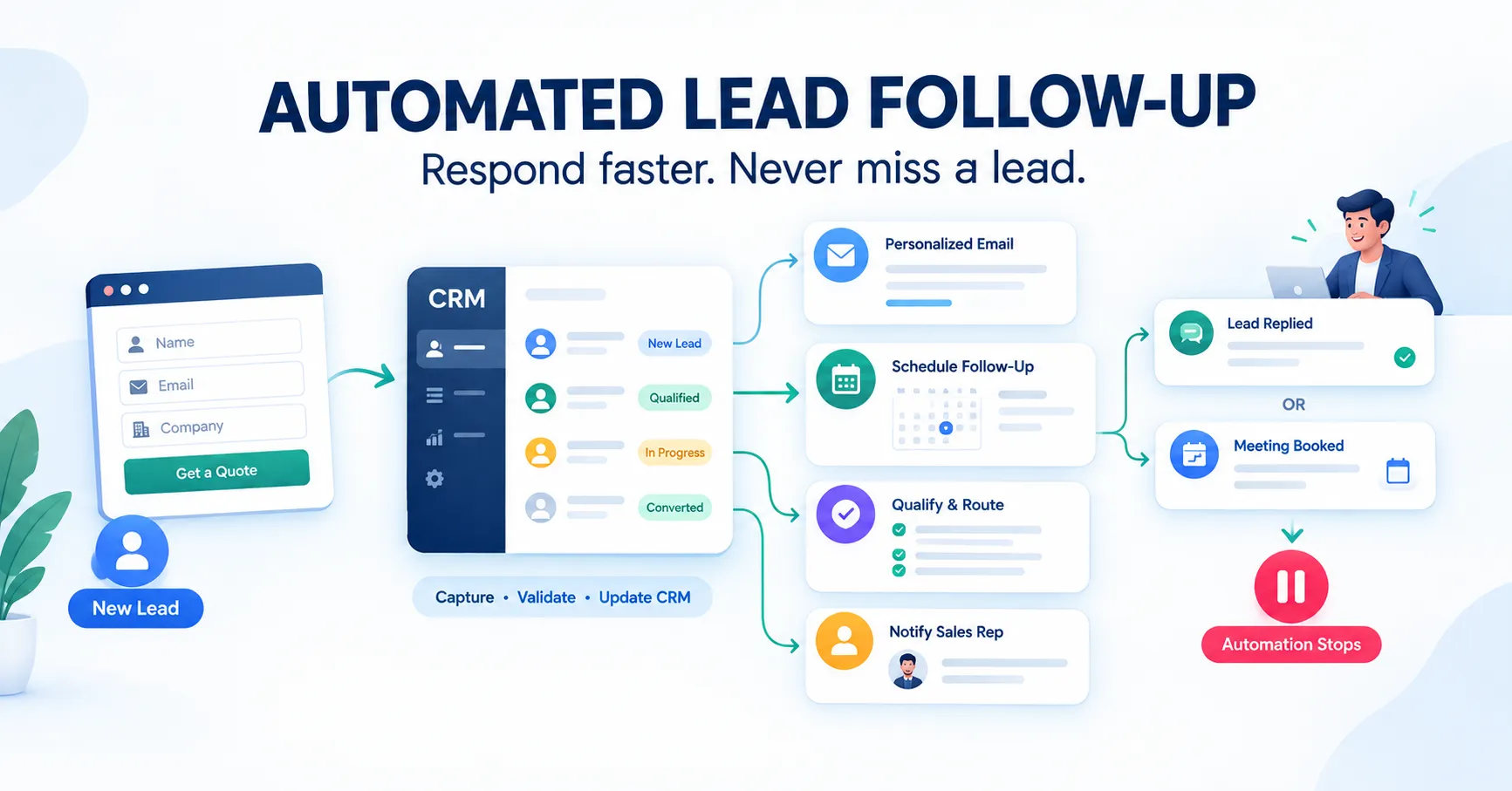
Automated lead follow-up is meant to solve a practical problem. A new lead may arrive after hours, your team may not see the form until the next morning, and the person may already be talking to other companies. A good lead follow up system can capture the lead, check the data, update the CRM, send the right reply, schedule later follow-ups, notify the right person, and stop when the lead replies or converts. Lead follow-up automation should not mean sending the same generic sequence to every person in the database. Good automation works more like an organized sales assistant: it handles repeat work in a steady way and hands off the cases that need human judgment.
This guide covers automated lead follow-up, automatic lead follow up, and the parts of a lead follow up workflow that matter most.
What Is Automated Lead Follow-Up?
Automated lead follow-up is a system that performs set actions after a possible customer enters your sales process. The first action may happen at once. A prospect submits a quote request and gets a confirmation within seconds. Later actions depend on what the lead does. If the prospect books a meeting, the sequence stops. If they do not reply after two days, the system may send another message. If the lead asks for enterprise service, the system may notify a salesperson right away instead of placing the prospect into a normal nurture flow.
The automation therefore involves more than scheduled emails. A mature lead follow up system often connects several parts of a business:
Lead source → validation → CRM → screening → routing → response → follow-up → human handoff → reporting
Each part has a different job. The lead source tells the system that someone has shown interest. Validation checks whether the incoming information is usable. The CRM becomes the main record. Screening helps decide priority. Routing sets who should own the lead. Messaging handles the reply. Human handoff lets a salesperson take over when needed.
The result is a connected workflow rather than a pile of separate tools.
Why Manual Lead Follow-Up Breaks Down
Manual follow-up is not always bad. For a freelancer receiving two inquiries a month, replying by hand may be perfectly reasonable. Problems begin when volume, complexity, or the number of lead sources grows.
The first weakness is response time. Someone has to notice that a new lead arrived before anything happens. During working hours that may take fifteen minutes. At night or over the weekend it may take many hours.
The second weakness is consistency. One salesperson may respond at once. Another may wait until the end of the day. One person may follow up three times. Another may assume silence means rejection after a single message.
The third weakness is admin work. Someone has to copy information between systems, create CRM records, assign owners, set reminders, update stages, and record outcomes. Each task is small, but together they consume time that could be spent talking to prospects.
The fourth weakness is visibility. Without a steady process, it becomes hard to answer simple questions such as:
How many leads received a response? How quickly did we respond? How many leads are waiting for follow-up? Which lead source produces the most qualified inquiries? How many prospects did we lose because nobody contacted them again?
Automation creates structure around those questions. It does not guarantee sales. It makes the sales process measurable and repeatable.
How an Automated Lead Follow-Up System Works
Imagine that somebody requests a consultation through a business website. The submission contains their name, email address, company, requested service, budget range, and a short description of the project.
Without automation, that form might simply send an email alert. With a properly designed lead follow up workflow, the submission becomes an event that starts a process.
The system first receives the data and checks whether the required information exists. It can fix the name, make the email lowercase, tidy up the phone number, add campaign details, and show where the lead came from.
The system then searches the CRM. If the email is already in contacts, it updates the record instead of making a copy. If the person is new, they create a contact and perhaps a new opportunity.
Business rules then decide what should happen. A lead requesting a small website may enter one path. A company requesting a custom integration may enter another. We may route an existing client directly to the account owner.
The prospect receives an appropriate acknowledgement. At the same time, the relevant person inside the company can receive a note with the important details.
If the automation does not require any manual action, it waits. Future actions depend on events rather than simply following a rigid calendar. If the lead books a meeting, the sequence stops. If they reply, automation pauses and ownership moves to a person. If they take no action, we may schedule another follow-up.
This event-driven design is much more useful than blindly sending messages every two days.
What Should Trigger Lead Follow-Up Automation?
The most common trigger is a website form submission, but it is far from the only one. A trigger can be almost any meaningful event that shows a person has entered or moved through your sales process.
Someone might request a quote, download a resource, book a consultation, submit a Facebook lead form, send a message through live chat, reply to an outbound campaign, complete part of an application, or reach a certain stage inside the CRM.
The right trigger depends on the business. A home-services company may begin follow-up when someone requests an estimate. A software company may start when a prospect requests a demo. An agency might start when someone submits a project brief. An e-commerce company might use a different workflow for abandoned carts or high-value product inquiries.
The important question is not only what event can start the automation. It is what event tells us enough about the person's intent to decide what should happen next. That distinction prevents weak automations from firing needlessly.
How to Automate Lead Follow-Up Step by Step
A reliable system is easier to build when each responsibility is separate.
Capture the lead. Start with a reliable source such as a website form, booking system, CRM, ad platform, webhook, or API. Capture contact details plus useful context such as source, service interest, campaign, page URL, and message.
Check and clean the data. Verify required fields before the lead moves deeper into the workflow. Clean names, email addresses, phone numbers, dates, country codes, and other structured fields. Invalid or incomplete information should follow a controlled exception path instead of silently breaking the automation.
Check for existing records. Search the CRM or database using a stable ID such as an email address or customer ID. Updating an existing record is usually better than creating another contact every time the same person submits something.
Create or update the CRM record. Store the lead in the system your team actually uses. Keep the source, timestamps, service interest, campaign information, and key notes so the sales team has context later.
Screen or segment the lead. Apply business rules using information you already have. A lead can be grouped by service, company size, location, budget, urgency, existing-customer status, or other factors that matter to the business.
Send the first response. Acknowledge the inquiry quickly and clearly. Tell the person what happened, what will happen next, and what they can do in the meantime. Do not pretend that an automated acknowledgement is deeply personal.
Notify or assign the right person. High-priority leads may need immediate human attention. The automation can assign ownership in the CRM and send an internal note through email, Slack, Microsoft Teams, or another channel.
Schedule conditional follow-ups. Instead of a rigid sequence, check whether the next message is still right before sending it. Has the person replied? Booked a meeting? Converted? Opted out? Have you been contacted manually? If so, the sequence should change or stop.
Handle human handoff. Once a salesperson takes ownership, automated messages should not continue blindly. The system needs a reliable way to detect that ownership has changed.
Track outcomes and failures. Record important events such as messages sent, replies, bookings, conversions, errors, and workflow failures. Automation without monitoring eventually becomes hidden technical debt.
This structure may look more complex than linking a form to an email tool, but those extra controls are what make the workflow reliable enough for real business.
Example: A Complete Automated Lead Follow-Up Workflow
Consider a small software agency receiving leads through its website.
A visitor lands on the Business Automation service page and submits a consultation form. The form sends the lead information to an automation platform.
The workflow checks the email address, verifies that required fields exist, and creates a normalized data object. It then searches the CRM for an existing contact with the same email address.
If the contact exists, the system updates the record. If the contact does not exist, it creates one.
The lead's requested service is then reviewed. Suppose the person selected Business Automation, gave a realistic budget, and described a specific workflow problem. The system marks the opportunity as relevant and creates a sales task.
An acknowledgement email is sent at once. The message confirms that the inquiry was received and explains that the team will review the workflow needs.
An internal note is also sent to the person responsible for automation projects.
The CRM now contains the contact information, service interest, original message, source page, submission timestamp, and assigned owner.
If the salesperson contacts the lead and changes the CRM status to Contacted, the automated nurture sequence stops. If nothing happens after a set period, the workflow checks the CRM again before sending another message.
That second message may provide something useful rather than simply saying just following up. For example, it could point the prospect toward a practical guide that explains how business-process automation projects are usually judged. If the lead then books a consultation, the booking system updates the CRM and the follow-up sequence ends.
Nothing keeps going needlessly. A weak automation knows how to send messages. A good automation also knows when not to send them.
Automated Follow-Up Emails Should Have a Purpose
Many businesses treat follow-up as a chain of increasingly awkward reminders.
Just checking in.
Following up again.
Wanted to bump this to the top of your inbox.
Automation makes it possible to send those messages at scale, but scale does not make them useful.
Each follow-up should have a reason to exist. The first message can confirm receipt and set expectations. A later message might provide details, answer a common concern, share a relevant resource, or invite the prospect to choose a meeting time.
Another message might ask whether circumstances have changed. This is where lead nurturing automation should help. The goal is not to maximize the number of messages sent. The goal is to help the right prospect take the next useful step.
That also means different leads may need different sequences. Someone who asked for an urgent quote should not always receive the same workflow as someone who downloaded an educational guide.
Email, SMS, WhatsApp, or Phone?
The right channel depends on the business, the lead source, user expectations, consent, geography, and how fast the inquiry needs attention.
Email works well for detailed communication, documents, proposals, booking links, and lower-pressure follow-up. If you need lead follow up email automation, email is often the first channel to get right.
SMS can work well when the user expects fast transactional communication, especially around appointments or time-sensitive inquiries.
WhatsApp can be useful in markets where customers already use it as a normal business communication channel.
Phone calls remain important for high-intent or complex leads where conversation is more effective than a message.
The best systems do not use every available channel at once. They choose channels on purpose. A lead who gave only an email address should not enter an SMS sequence. A person who clearly asked for a call should not receive five emails before anybody phones them.
Channel choice is part of workflow design, not just marketing.
Lead Follow-Up Timing
A universal perfect follow-up schedule does not exist.
A person requesting emergency plumbing and a company evaluating enterprise software have very different expectations. High-intent inquiries often justify a faster response. Longer sales cycles usually require more patience.
Instead of searching for a magical sequence such as day one, day three, day seven, begin with the buying process. Ask how quickly a reasonable prospect would expect acknowledgement. Ask how long they typically need before making a decision. Ask what actions show that the lead is still interested.
Then design the sequence around those realities.
Timing logic can also account for business hours. Suppose a lead submits a form at 2:00 AM. Sending an immediate acknowledgement may be fine. Sending an SMS that looks like it came from a salesperson at 2:01 AM might feel strange. The workflow can acknowledge receipt right away while delaying human-style communication until an appropriate local time.
This becomes especially important when serving customers across multiple time zones.
When Should Automated Follow-Up Stop?
Stop conditions are one of the most important parts of a lead automation system.
Without them, automation becomes irritating rapidly.
A sequence normally stops or changes when the lead replies, books an appointment, converts, opts out, becomes disqualified, or a salesperson manually takes over.
The system should check those conditions before each meaningful follow-up. That check needs a reliable source of truth. If the CRM is the main sales system, CRM status may control whether future steps continue. If the email platform processes replies, a reply event can update the CRM. If bookings happen in a scheduling platform, the booking event should update both systems.
This is why integrations matter. An automation cannot make good decisions when every system has a different understanding of the customer.
Lead Screening and Follow-Up Should Work Together
Not every lead deserves the same amount of attention.
A company can receive inquiries from excellent prospects, students doing research, vendors trying to sell something, people outside the service area, spam bots, existing customers, and businesses whose needs do not match the service.
Lead screening helps separate those cases.
Screening can be simple. For example, a service business might review location, requested service, urgency, and budget. A B2B company may value company size, role, industry, existing technology, purchase timeline, and problem severity.
The follow-up workflow can then adapt. A highly relevant lead can be assigned at once. A lower-priority but legitimate prospect can receive educational follow-up. An obviously unsuitable submission may receive a polite reply without creating unnecessary sales work.
Screening should not be treated as a mysterious AI problem. Clear business rules are often enough.
AI becomes useful when the inputs are less structured, such as reading a free-text project description or classifying the general intent of a message.
This topic deserves deeper treatment on its own, which is why automated lead screening can later become a separate support guide.
Rule-Based Automation vs AI Lead Follow-Up
AI can make lead automation more flexible, but it should not replace every fixed rule.
A useful principle is:
Use rules where the outcome must be predictable. Use AI where interpretation is genuinely useful.
For example, a rule is right for: if country is outside the service region, do not assign the lead to the local sales team. You do not need an AI model to decide that. Likewise: if the CRM opportunity is marked Won, stop all sales follow-up. That should be fixed.
AI becomes more useful for tasks such as summarizing a long inquiry, classifying the likely service category, pulling requirements from unstructured text, or generating a draft reply for human review.
Even then, sensitive actions should have limits. An AI-generated message should not be allowed to invent pricing, contract terms, delivery dates, or policies that were never approved.
Production automation works best when AI sits inside a controlled workflow rather than controlling the workflow itself.
Human Handoff Is Part of the Automation
Automation is sometimes described as a replacement for manual work. That framing is incomplete.
In a sales process, the goal is often to remove repetitive admin so humans can spend more time on conversations that actually need them.
A lead may begin inside an automated workflow and eventually reach a point where human judgment becomes more valuable. Perhaps the person replies with a detailed technical question. Perhaps they ask for custom pricing. Perhaps they are a high-value prospect. Perhaps the workflow detects uncertainty.
At that point, ownership should move cleanly to a person.
The salesperson should have all the context collected so far: the original source, previous messages, CRM history, lead score, service interest, and any relevant actions.
A bad handoff makes the customer repeat everything. A good handoff feels continuous.
What Data Should You Store?
Automations become much easier to maintain when the data model is designed on purpose.
At minimum, most lead workflows need stable contact information and status.
Useful fields may include contact name, email address, phone number, company, source, campaign, service interest, assigned owner, screening status, lifecycle stage, last contact time, next follow-up time, opt-out status, and conversion status.
You may also want technical fields that users never see.
For example:
last_follow_upfollow_upstatussourcelast_errorhuman_ownerstop_reason
These fields make the workflow visible.
If something goes wrong, you can see where the lead was and why the system acted as it did. Without that visibility, troubleshooting turns into guesswork.
Handling Duplicate Leads
Duplicate records are one of the easiest ways to create awkward follow-up behavior.
Suppose a prospect submits your form twice.
If the workflow blindly creates two CRM contacts and starts two sequences, the person may receive duplicate messages.
The fix is usually idempotent processing. Before creating a new lead, search for an existing record using a stable identifier. Email is often useful, although the right identifier depends on the business.
If a matching record exists, decide whether the new submission should update the old opportunity, create a new opportunity under the same contact, or trigger a different action.
A universal answer does not exist. What matters is that the behavior is intentional.
Error Handling and Retries
Real integrations fail.
APIs time out. CRM services temporarily return errors. Access tokens expire. A field that was once optional now requires completion. Someone deletes a CRM pipeline stage that the automation depends on.
A reliable lead follow-up workflow assumes failures will happen.
Critical steps should have clear error handling. Temporary failures may be retried. Permanent failures should be sent to manual review.
The system should avoid creating duplicate actions during retries. For example, if the CRM request times out, you do not want the retry mechanism to by mistake create five identical opportunities.
Monitoring is therefore part of the product. A workflow that looks successful only because nobody sees its failures is not reliable automation.
Email Delivery Matters
Automating email is easy.
Getting those emails reliably delivered is a separate problem.
Businesses should pay attention to sender reputation, email auth, list quality, bounce handling, and message relevance.
Follow-up automation should also respect unsubscribes and communication preferences.
Do not build a workflow where someone opts out in one system but remains active in another. The opt-out state should propagate to whichever platform controls messaging.
For SMS, WhatsApp, and other channels, requirements may vary by provider and jurisdiction. Before automating high-volume outreach, make sure your process respects the consent, identification, and opt-out rules that apply.
Technical ability is not the same thing as permission to contact someone.
When No-Code Automation Is Enough
Not every lead workflow needs custom software.
A small business using a common CRM, standard website forms, Gmail, and a scheduling tool can often build a strong system with platforms such as Make.com or Zapier. In many cases, that is enough lead follow up software for the job.
No-code automation is especially useful when the workflow is well defined and the required systems already expose good integrations.
Custom development becomes more useful when the workflow has complex logic, high volume, unusual data requirements, private systems, strict performance needs, complex permissions, or features that standard automation platforms cannot express cleanly.
Hybrid systems are common. Make.com might run the process while a custom API handles special logic.
The best architecture is not always the most impressive one. It is the simplest architecture that can reliably meet the needs.
Common Automated Lead Follow-Up Mistakes
Most lead automation problems are not caused by a lack of features.
Poorly defined behavior causes them.
One common mistake is automating before understanding the existing process. If the manual workflow is inconsistent, automating it often produces a faster version of the same bad process.
Another is sending the same sequence to every lead. Different sources and intentions usually deserve different treatment.
Another is ignoring stop conditions. A lead replies, but automated messages keep going for another week.
Duplicate records create a similar issue.
Weak workflows also tend to ignore exceptions. They design them only for the perfect path where every API works and every field contains valid data.
Additionally, a tendency to automate too much exists.
We should not template every sales conversation.
AI should not score every lead.
Not every reply should trigger another automatic reply.
A good system knows where automation ends.
How to Measure Lead Follow-Up Automation
The value of an automated system should be measurable.
Start with response time. How long does it take between a lead sending an inquiry and receiving a proper first response?
Then look at system reliability.
How many leads enter the CRM successfully? How many workflow runs fail? How many contacts receive duplicate messages? How many leads have no assigned owner?
Then measure sales outcomes.
Reply rate can show whether people are engaging with follow-up. Booking rate shows whether conversations move forward. Qualified-lead rate shows whether the lead sources themselves are useful. Conversion rate ultimately shows whether qualified prospects become customers.
Those metrics should be reviewed together.
A follow-up sequence that gets a high reply rate but mostly angry unsubscribe requests is not successful.
Automation is useful when it improves the process, not when it simply increases activity.
Building a Production-Ready Follow-Up Workflow
A large difference exists between a demo automation and a workflow that a business can depend on every day.
A demo proves that two tools can communicate.
A production workflow handles duplicates, auth failures, retries, missing fields, human overrides, status sync, permissions, monitoring, logging, opt-outs, and changing business rules.
That does not mean every project should become needlessly complicated.
It means reliability should match the importance of the process.
If losing a lead costs the company real revenue, the workflow deserves more safeguards than an internal alert used for convenience.
Think about the cost of failure before deciding how much engineering the automation needs.
Q&A
Question: What is the main purpose of automated lead follow-up?
Short answer: Automated lead follow-up is meant to make the sales process faster, more consistent, and more reliable. It captures new leads, updates the CRM, sends the right reply, schedules follow-ups, notifies the right person, and stops when a lead replies, books, converts, opts out, or needs human attention. The goal is not to replace salespeople. It is to remove repeat admin work so humans can focus on real conversations.
Question: Why should automated follow-up be event-driven instead of just time-based?
Short answer: A simple time-based sequence sends messages on a fixed schedule whether they are still appropriate or not. An event-driven workflow checks what has happened before taking the next step. If the salesperson books a meeting, replies, converts, or takes over the lead, the automation can stop or change direction. This prevents awkward duplicate messages and makes the follow-up feel more relevant.
Question: Should every lead receive the same automated follow-up sequence?
Short answer: Usually no. Different leads have different levels of intent, urgency, and value. A high-priority quote request, a demo inquiry, an existing customer request, and a low-intent resource download should not all receive the same messages. Good automation uses screening and segmentation to decide what response, routing, timing, and channel make sense for each lead.
Question: When is no-code automation enough, and when is custom development better?
Short answer: No-code tools such as Make.com or Zapier are often enough when the workflow is simple, the systems already integrate well, and the business rules are clear. Custom development becomes more useful when the workflow involves complex logic, high volume, private systems, unusual data requirements, strict permissions, or specialized API behavior. The best solution is the simplest architecture that can reliably support the actual sales process.
Question: What are the most important safeguards in a production-ready follow-up workflow?
Short answer: A production-ready workflow should handle duplicate leads, missing or invalid data, CRM sync, opt-outs, human handoff, retries, API failures, logging, monitoring, and stop conditions. It should not send the same message twice when retrying and provide the sales team with clear information about each lead's status. Reliability matters because a broken automation can quietly lose leads or damage the customer experience.
Automation Should Make Follow-Up More Human, Not Less
The purpose of automated lead follow-up is not to remove people from sales.
It is to remove the repetitive admin work that prevents people from doing sales well.
A good workflow acknowledges new inquiries quickly. It keeps customer data organized. It remembers follow-ups. It routes opportunities correctly. It catches failures. It stops when a human needs to take over.
Most important, it gives the prospect a steady experience without forcing someone on your team to manually coordinate every step.
The technology can be simple or sophisticated.
What matters most is the process behind it.
Before choosing a platform, map what happens today.
Find where leads are lost.
Define who owns each stage.
Decide what automation may do.
Define when it must stop.
Then build the workflow around those rules.
If your business still depends on manual lead alerts, spreadsheets, scattered inboxes, or people remembering when to follow up, a well-built automation can turn that fragile process into something much more reliable.
SaeSoft designs business automation workflows that connect forms, CRMs, APIs, messaging platforms, databases, and internal systems. If you need a lead follow up process designed around your actual sales workflow rather than a generic email sequence, explore our Business Automation services.